
Access control with your own phone, it is possible with the new i-Reserve scanner app
In today's society, we're increasingly working with access control. How do you keep track of whether someone has a reservation or not? Are you still working with attendance lists, printed tickets, or e-tickets on a screen? The i-Reserve reservation system offers a new solution. Scan the QR code you provided on the customer's e-ticket with your own phone and immediately see whether it's valid or not.
Your own scanner app
Our new QR scanner app is included free with the e-ticket module. This means you no longer need an additional contract with a third-party scanner provider. With our app, you can scan e-tickets using your own devices. The QR scanner app is free to install from various stores. We don't charge extra per ticket scanned. Besides the cost of the e-ticket module within i-Reserve , there are no additional costs for scanning.
E-ticket with QR code as entrance ticket
E-tickets are used in various industries. Using e-tickets is often convenient when a computer is not immediately available and a reservation needs to be approved quickly. Examples include course participants, boat rentals , or guided tours. In most cases, an e-ticket will be sent to the customer via email. This can serve as immediate confirmation of the reservation. It is, of course, also possible to create an e-ticket manually. In both cases, a PDF template is required in which a QR code is generated. QR stands for 'Quick Response'. It is a square, checkered barcode. You scan this code with the QR scanner app on your phone, and your customer's attendance is confirmed. An additional benefit is that the reservation details are processed immediately after scanning. No more hassle with attendance lists and printed tickets with the i-Reserve QR scanner app.
How does the i-Reserve QR scanner app work?
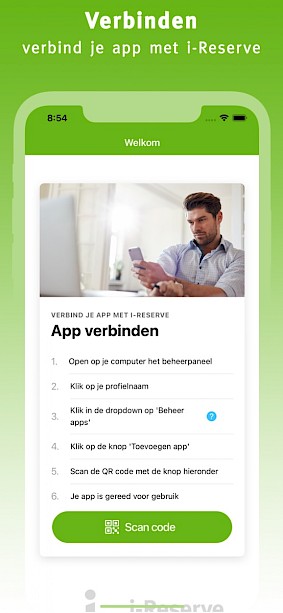
Do you have an i-Reserve license with an e-ticket module? Then you can get started right away. The scanner app is included as a service. Install the app on your phone or another device. The app can be installed on as many devices as you like. You can log in with a QR code through your i-Reservemanagement environment. This will connect the scanner to your environment. The app works with a dark or light theme and is available in Dutch and English.
Do you have an i-Reserve license but no e-ticket module? Or don't have an i-Reserve license at all? No problem! You can try out the i-Reserve Scanner App yourself on our App Simulation page. Go to the simulation page and follow the instructions.
Access control with the scanner app
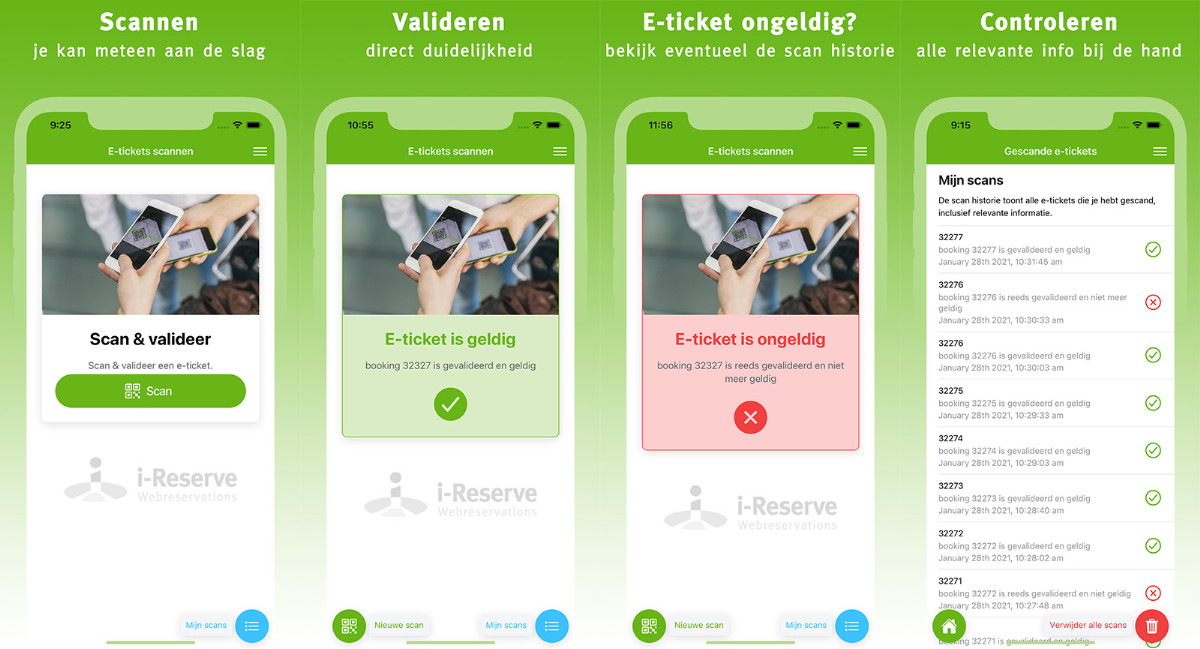
On the day of the tour or course , scan the QR code on the customer's e-ticket. Within a second, you will see a green or red screen. This makes it immediately clear whether the ticket is valid. Scanning a code a second time will result in a red screen. If there is a problem or something goes wrong, you can always consult the scan history in the app. The e-ticket, and therefore the QR code, is linked to the reservation. This reservation can be retrieved at any time. Via the management environment, you can easily check whether the visitor or customer is 'in'. The reservation will then state that the 'e-ticket has been validated'.
Getting started?
Do you have the e-ticket module and want to get started right away? Then download the i-Reserve scanner app on your phone (or other device). Would you like our assistance with this? Or are you curious about the possibilities of the e-ticket module? Please contact us.